
PSOU Assignment 2026: Front Page Format, Submission Rules and Evaluation Scheme
PSOU assignment downloads and uploads are processed through the official Learning Management System portal using registered student login credentials. PSOU has not published a standardized front page template on its site as of 12 October 2026.
In this article
- PSOU Alerts & Notifications
- PSOU assignment front page format – university site
- PSOU assignment download procedure – LMS portal
- PSOU assignment submission rules – LMS portal dashboard
- PSOU assignment evaluation – internal assessment component
- PSOU Assignment official links and PDFs
- What students ask about PSOU Assignment
The essentials
- Submission Portal
- PSOU LMS Portal
- Internal Assessment Weightage
- 30 Marks out of 100
- External Exam Weightage
- 70 Marks out of 100
- Minimum Pass Percentage
- 35%
- Assignments per Course
- 3 per course file
- LMS Support Email
- lms@psou.ac.in
PSOU assignment front page format – university site
PSOU assignment front page format templates have not been published as a standardized document on the university site as of 12 October 2026.
Learners must prepare course assignment files based on syllabus topics to earn internal assessment marks towards their final score.
PSOU assignment download procedure – LMS portal
PSOU assignment question papers and course study materials are downloaded directly from the university Learning Management System portal.
- Visit the official university website and select the Study Material option on the top navigation bar.
- Open the PSOU LMS login page and enter the credentials sent to your registered mobile number during admission.
- Select the Study Material tab on your student dashboard after successful login.
- Click on the Courses sub-tab to view all registered course subjects under your programme.
- Click the Course Content button for a specific subject to open available course resources.
- Click the Download button to save the assignment question paper and study material to your device.
PSOU assignment submission rules – LMS portal dashboard
PSOU assignment submission is completed online through the Learning Management System portal dashboard.
PSOU has not published direct offline submission deadlines for the July 2026 session on its portal as of 12 October 2026.
- Log into the PSOU student login portal using your assigned login credentials.
- Click on the Upload Assignments tab located in the left menu bar.
- Select the specific course paper and click the Submit button.
- Select your completed assignment file and upload your submission on the portal page.
More from PSOU
PSOU assignment evaluation – internal assessment component
PSOU assignment evaluation forms the internal assessment component for course papers, contributing directly to the final grade.
- Learners prepare 3 assignment submissions based on prescribed course syllabus topics to complete the internal assessment file.
- The overall course passing criteria requires obtaining a minimum of 35% marks across internal and external evaluations.
PSOU Evaluation and Marking Distribution Scheme
| Evaluation Component | Marks Allocated | Passing Percentage Requirement |
|---|---|---|
| Internal Assessment (Assignments) | 30 Marks | 35% |
| External Examination | 70 Marks | 35% |
| Total Course Evaluation | 100 Marks | 35% |
What students ask about PSOU Assignment
How do I download my PSOU assignment question paper?
Learners download assignment question papers by logging into the PSOU LMS portal using credentials sent during admission. Navigate to the Study Material tab on your dashboard and select Courses. Click on Course Content for the specific subject, and then click the Download button to save the assignment file to your device.
Where do students submit PSOU assignments online?
PSOU assignment submissions are uploaded online through the official PSOU LMS portal at student.psou.ac.in/Login. Learners log in using mobile credentials received during July 2026 admission and select Upload Assignments from the dashboard menu.
What is the weightage of PSOU assignments in final course marks?
PSOU assignments carry a 30-mark weightage out of 100 total marks per course as an internal assessment. The remaining 70 marks are for the external term-end examination in the July 2026 academic session.
How many assignments must be submitted per PSOU course?
Learners must submit 3 distinct assignments for each PSOU course paper, compiled into a single submission file. These form the 30-mark internal assessment component for the July 2026 academic session.
What is the pass percentage for PSOU course evaluation?
The minimum pass requirement for PSOU course evaluation is 35%, combining internal assessment and external examination scores. Internal assignments account for 30 marks, while the external term-end exam carries 70 marks out of 100 total for the July 2026 session.
How do students log into the PSOU LMS portal to access assignments?
Students log into the PSOU LMS portal at student.psou.ac.in/Login using their registered Email ID or Student ID and password. Initial credentials are sent to the mobile number registered during the university admission process for the July 2026 session.
Who can students contact for PSOU examination and helpline support?
For examination queries, contact the Examination Helpline at 9530741524 or email coepsou@psou.ac.in. Admission assistance for the July 2026 session is available at 9463082523 or admission.helpline@psou.ac.in.
What is the total mark distribution and credit value for a PSOU course paper?
A PSOU course paper carries 100 marks and 4 academic credits. Evaluation is 30 marks for internal assignments and 70 marks for the term-end external examination. A mandatory 35% pass percentage applies to July 2026 session papers.
What was the last date of admission for the PSOU July 2026 session?
The last date of admission for the PSOU July 2026 session was 10th October 2026. Admitted students received LMS login credentials on their registered mobile numbers. They access their dashboard at student.psou.ac.in/Login for study files and assignment submission.
How do learners access PSOU course content and study material online?
Learners access PSOU course content and study material online via the Study Material tab on the student LMS dashboard. Log into student.psou.ac.in/Login, click the Courses sub-tab, then the Course Content button for a subject. Click Download to save files.
What is the paper pattern and time duration for PSOU external term-end exams?
PSOU external term-end exams are 3 hours long and worth 70 marks. The paper has three sections: A and B with four 10-mark questions each, and C with fifteen 3-mark questions. Students attempt two from A and B, plus ten from C.
Can students submit PSOU assignments offline at university study centers?
PSOU requires online submission for course assignments; no offline dates were published as of 12 October 2026. This applies to all July 2026 academic session students. Access student.psou.ac.in/Login, click Upload Assignments, select the paper, and upload your file.
How can students reset their password if they forget their PSOU LMS login details?
Students reset their password by selecting Forgot Password or Login With OTP on student.psou.ac.in/Login. Initial credentials are sent to the mobile number registered during admission. Learners enter their Student ID or Email ID to access the dashboard.
Where can students access official user manuals for PSOU study material and LMS portal?
Learners can access official user manuals directly on the PSOU student login portal at student.psou.ac.in/Login. The portal page provides links for User Manual for Study Material, User Manual for Admission, and User Manual for Admit Card for the July 2026 session. Registered students use these resources to navigate assignment downloads.
How many learner support centres does PSOU operate for student assistance?
PSOU operates a network of 10 Learner Support Centres and Study Centres across Punjab to assist registered students. Learners enrolled in the July 2026 academic session can utilize these centers for academic guidance while using the portal. Internal course assignments worth 30 marks must still be uploaded directly at student.psou.ac.in/Login.
Has PSOU released a standardized front page format template for assignment submission?
PSOU has not released a standardized front page format template for assignment submissions as of 12 October 2026. Students in the July 2026 session compile three assignments per course into a single file for their 30-mark internal assessment. To submit, log into student.psou.ac.in/Login and click Upload Assignments.
PSOU Assignment official links and PDFs
- Log into PSOU student login portalstudent.psou.ac.in ↗
- Access PSOU LMS login pagestudent.psou.ac.in ↗
- View official PSOU contact detailspsou.ac.in ↗
PSOU Assignment 2026 PDF
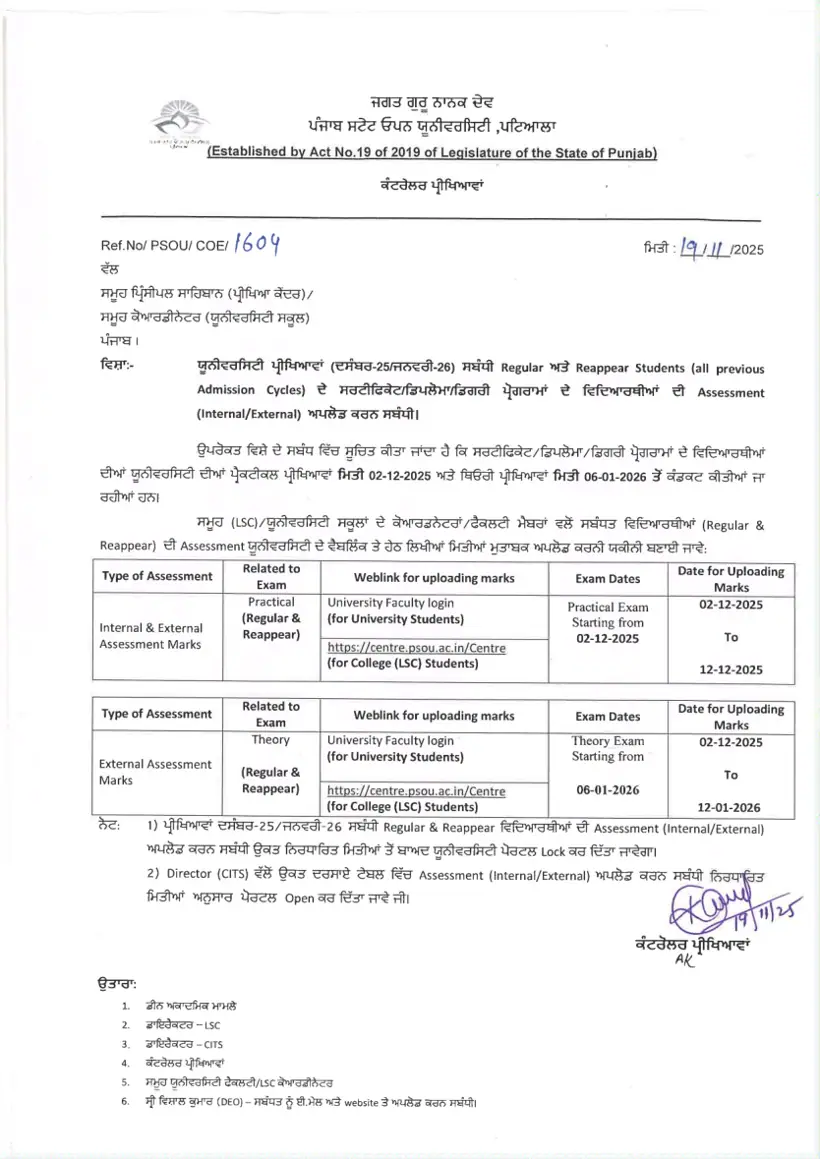
- PSOU Internal and External Assessment Submission Notice December 2025 PDF — Instructions for learning support centres to upload internal and external assessments for December 2025 and January 2026 examinations.
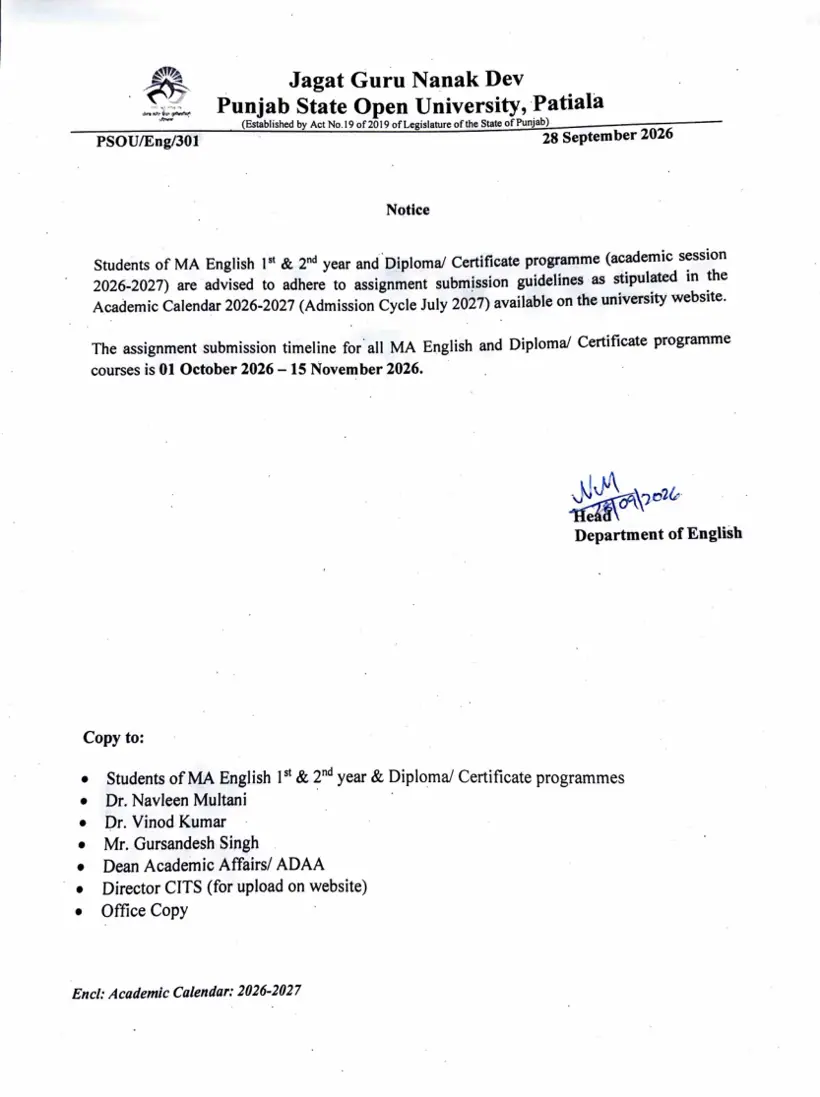
- PSOU MA English Assignment Submission Notice October 2026 PDF — The English department provides assignment submission dates and instructions for students of MA English and diploma or certificate programmes.